 Annual Leave Tracker
Simplify HR with Employee Leave Management Software

Are you still juggling a chaotic mix of spreadsheets, scribbled notes, and endless email chains just to track time off? If that sounds familiar, you already know how this manual approach leads to mistakes, unfair policy enforcement, and a whole lot of frustration for everyone. This is precisely the problem that employee leave management software is designed to solve, acting as a single, automated hub for everything leave-related.
Moving Beyond Spreadsheets and Paper Forms
For many businesses just starting out, managing holiday requests with a simple spreadsheet seems like a perfectly sensible idea. It’s a shared document, managers can log approved dates—what could go wrong? The reality is, this system very quickly becomes a major operational headache, creating far more problems than it ever solves.
Imagine trying to navigate a bustling city centre with a crumpled, decade-old paper map. You might get by for a little while, but you’re bound to hit confusing turn-offs, outdated road information, and you certainly won't see real-time traffic jams. Manual leave tracking is the HR version of that paper map: clunky, full of errors, and completely unfit for a modern workplace.
The Problem with Manual Systems
Relying on these outdated methods creates a ripple effect of problems that drag down efficiency, accuracy, and even staff morale. The most common pain points we see are:
- Human Error: It only takes one typo in a spreadsheet to mess up someone's holiday pay, create an accidental shift clash, or completely miscalculate an employee's remaining leave balance.
- Lack of Visibility: Managers can’t get a clear, immediate picture of who is off and when. This makes it a real gamble to approve new requests without risking being short-staffed during a critical period.
- Inconsistent Policy Enforcement: Without a system to automate the rules, making sure that leave policies are applied fairly and consistently to every single employee becomes a nearly impossible task.
- Administrative Overload: HR teams end up wasting hours chasing managers for approvals, manually updating multiple calendars, and answering the same basic questions about holiday allowances over and over again.
This infographic lays out the stark difference between manual and digital leave tracking, showing just how powerful automation can be.
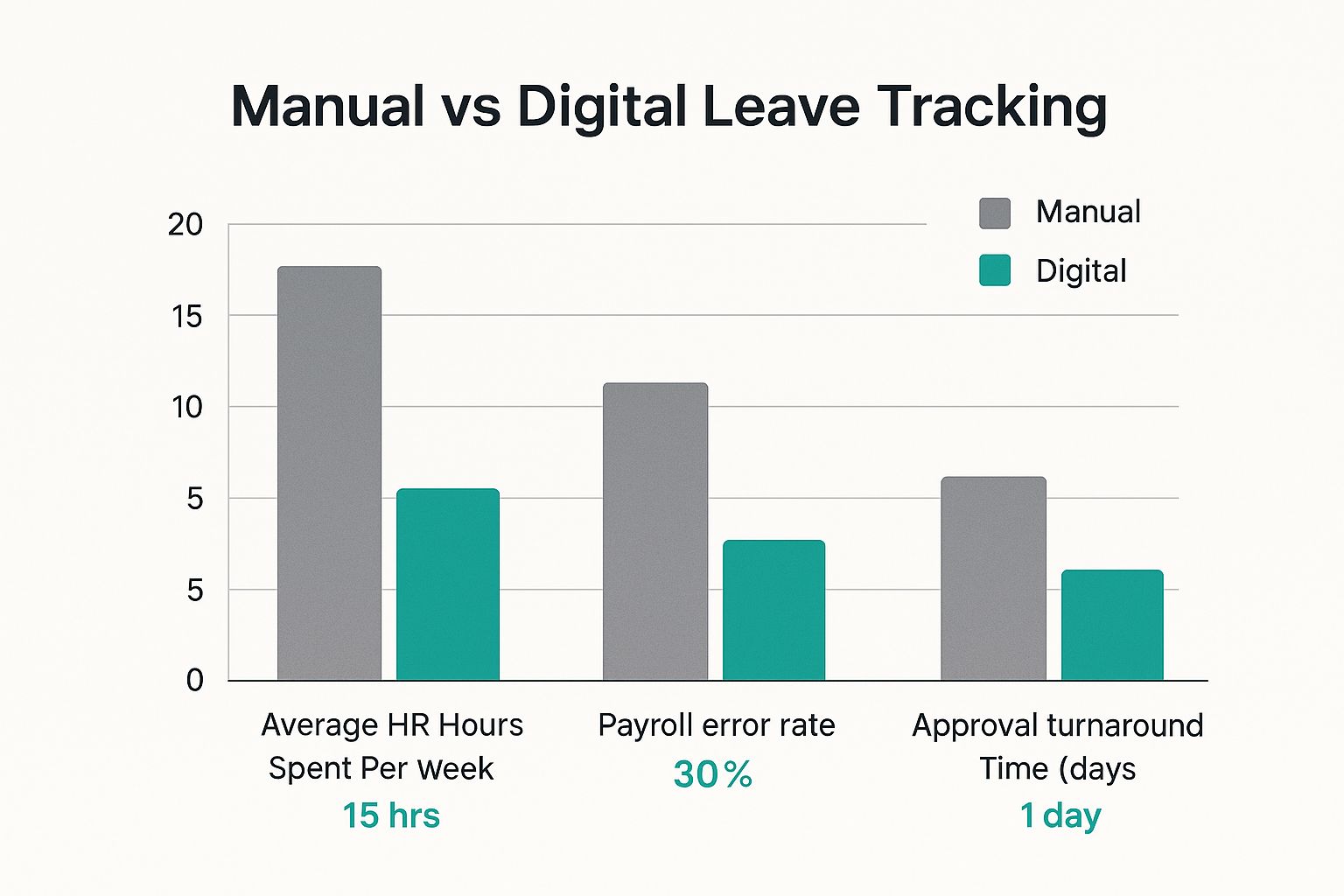
The numbers speak for themselves. Businesses see a massive drop in admin hours, payroll errors, and the time it takes to get leave approved once they switch to a dedicated system. This isn't just about making things more convenient; it's a strategic shift towards running a much smarter operation.
By automating all the routine, repetitive tasks, employee leave management software frees up HR professionals and managers to focus on what really matters—strategic work that supports business growth and employee well-being. It transforms a reactive, administrative burden into a proactive management tool.
This change is happening everywhere. The United Kingdom’s workforce management software market, which includes these tools, was valued at around $601.2 million USD and is expected to more than double, hitting $1,564.8 million USD by 2035. This huge growth points to a clear trend: UK businesses are embracing digital HR tools to become more efficient and scalable. You can dig deeper into this in the latest market analysis on UK workforce management market trends.
The Hidden Costs of Manual Leave Tracking

Relying on spreadsheets to track employee leave can feel like a simple, cost-effective solution at first. But as your team grows, this manual approach starts to show its cracks, quietly introducing risks and inefficiencies that can be incredibly costly. It's a bit like using a paper map on a long road trip—it works, but it's cumbersome, easily outdated, and can quickly get you lost.
The real costs of sticking with manual systems are often hiding in plain sight, disguised as everyday admin tasks. These small drains on time and money soon add up, which is why thinking of employee leave management software as a luxury is a mistake. It’s a fundamental tool for running a smooth and efficient business.
The High Price of Human Error
Let's be honest, spreadsheets are unforgiving. A single misplaced decimal, a broken formula, or a simple copy-paste error can ripple through your records and have a serious financial impact. Considering that research has shown nearly 90% of spreadsheets contain errors, using them for something as critical as payroll is a huge gamble.
When leave is tracked manually, these mistakes almost always lead to payroll blunders. An employee might be overpaid for leave they didn't have, or even worse, underpaid for a holiday they were entitled to. These aren't just financial issues; they erode trust and damage morale, creating a negative atmosphere that's far harder and more expensive to fix.
Lost Productivity and Administrative Drain
Beyond the direct financial hits, the biggest hidden cost is the sheer amount of time that gets wasted. Week after week, your HR team and managers lose precious hours to low-value administrative work that a system could handle in seconds.
Think about the typical manual process for a single holiday request:
- An employee has to email their request to a manager.
- The manager then has to hunt down the team spreadsheet to check for clashes.
- They forward the approval to HR.
- HR must then manually update the central leave tracker, the employee’s record, and the payroll system.
Each step is a bottleneck, a potential point of failure where things can get missed or delayed. This messy workflow pulls your skilled people away from strategic work—like hiring, training, or building a great company culture—and bogs them down in mundane data entry.
The true cost of manual leave tracking isn't just the price of a spreadsheet. It's the sum of every payroll error, every hour of wasted administrative time, and every poor staffing decision made with incomplete information.
Inconsistent Policies and Compliance Risks
Trying to enforce leave policies fairly across the board is nearly impossible with a manual system. Without automated rules, it's easy for one manager to approve a request that another might deny, leading to feelings of favouritism and inconsistent treatment.
This lack of standardisation can also create serious compliance headaches, especially in the UK with its specific regulations around statutory leave. A manual process leaves no reliable audit trail. If a dispute ever arises, trying to prove that policies were applied correctly becomes a nightmare. This leaves your business exposed to legal challenges and potential employment tribunals.
An employee leave management software, on the other hand, creates a clear, indisputable record of every request, approval, and calculation, protecting everyone involved.
Manual vs Automated Leave Management: A Direct Comparison
Seeing the differences side-by-side makes the case crystal clear. The old way of doing things simply can't compete with the accuracy and efficiency of a dedicated system.
| Feature | Manual Methods (Spreadsheets/Email) | Leave Management Software |
|---|---|---|
| Accuracy | Prone to human error, typos, and formula mistakes, often leading to payroll issues. | Automated calculations and data entry eliminate the vast majority of errors. |
| Visibility | No real-time view of team availability, leading to guesswork and scheduling conflicts. | Centralised team calendars provide instant, accurate visibility for better planning. |
| Efficiency | Requires hours of manual data entry, cross-referencing, and chasing approvals. | Self-service portals and automated workflows reduce administrative tasks by over 70%. |
| Compliance | Difficult to enforce policies consistently and lacks a clear, auditable trail of actions. | Built-in policy enforcement and a digital audit trail ensure fairness and reduce legal risk. |
Ultimately, moving away from manual methods isn't just about getting a new tool; it's about reclaiming time, reducing risk, and making smarter decisions for your business.
What to Look For in a Great Leave Management System
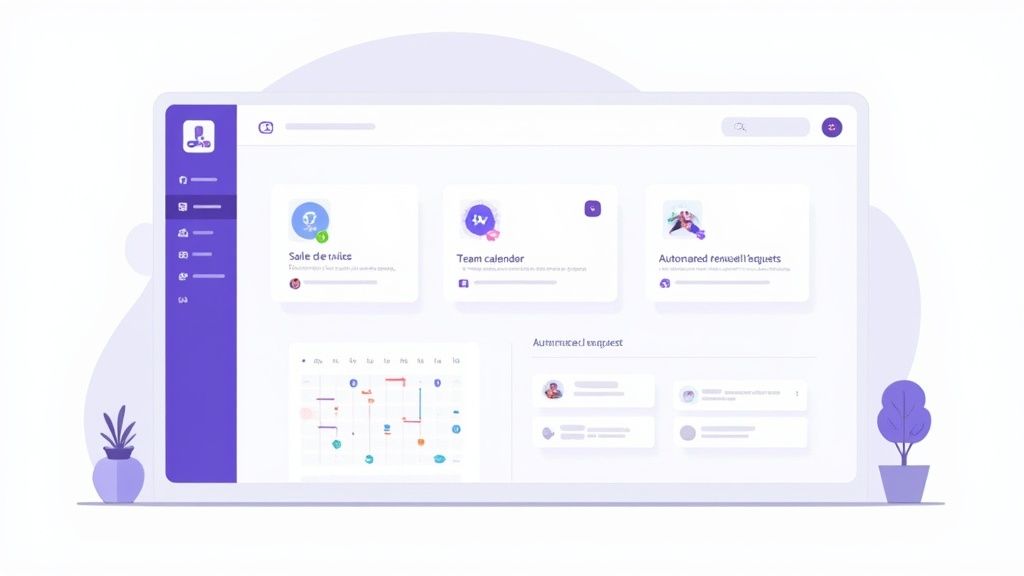
Choosing the right leave management software is a bit like picking the perfect tool for a crucial job. On the surface, many options seem to do the same thing, but the really effective systems are built around a handful of core features that genuinely make life easier for everyone.
These aren't just bells and whistles. They work together to turn a clunky, manual process into something smooth and automated. To help you sort the contenders from the pretenders, let’s break down the must-have features into three key areas: day-to-day operations, compliance, and how it all connects.
Nailing the Core Operations
These are the absolute fundamentals—the features that handle the daily grind of requesting, approving, and keeping track of time off. They are the engine of any decent system, designed to give everyone back their time.
First up is an employee self-service portal. This is a game-changer. It gives your team a single place to check their remaining leave, see who else is off on the team calendar, and pop in their holiday requests. This one feature alone dramatically cuts down on the endless back-and-forth emails and frees up HR from answering the same questions over and over.
Next, you need an automated approval workflow. Instead of requests getting buried in an inbox, the software instantly sends them to the right manager. They get a notification, can see the request alongside the team schedule, and approve or deny it with a click. It’s a clean, simple loop that keeps things moving.
And of course, a centralised team calendar is non-negotiable. This gives everyone a single, live view of all approved time off across a department or the whole company.
- For managers, it means smarter scheduling. No more accidentally leaving yourself short-staffed during a critical project.
- For employees, it provides transparency. They can plan their own time off without constantly having to ask who’s around.
This kind of visibility just isn't possible with a spreadsheet. If you want to dig deeper into these fundamentals, check out our complete guide to online leave management systems.
Staying Compliant and Gaining Insights
A great system does more than just track days off. It helps you stay on the right side of the law and turns your absence data into something genuinely useful for the business.
One of the most powerful features here is automatic accrual calculation. You can set up the software to handle your specific leave policies, and it will automatically work out holiday entitlement for everyone—full-timers, part-timers, and new starters alike. This takes the guesswork and human error out of tricky pro-rata calculations, ensuring everything is fair and compliant with UK regulations.
An effective leave management system doesn't just track what happened; it helps you understand why it happened. It turns raw absence data into actionable insights that can improve workforce planning and employee well-being.
This is where powerful absence reporting and analytics come in. With a few clicks, you can generate reports to spot trends, like a spike in sick days in one department or seasonal holiday patterns. Finding these patterns early lets you tackle potential issues—like burnout or morale problems—before they become bigger problems.
Connecting Your Tools Seamlessly
The best software doesn't exist in a vacuum. It should slot neatly into the other tools you rely on every day, creating a much more efficient way of working.
Payroll integration is a perfect example. By linking your leave system to your payroll software, paid and unpaid time off data is transferred accurately without anyone having to type it in manually. This practically eliminates the risk of costly payroll mistakes and saves your finance team a huge amount of time each month.
Similarly, calendar integration with tools like Outlook, Google Calendar, and iCal is essential. Once a holiday is approved, it automatically appears in the relevant work calendars. This ensures everyone, from team members to project managers, knows who is available, preventing scheduling headaches.
It's this demand for connected, intelligent tools that's fuelling major growth in the market. Globally, the absence and leave management software market is forecast to grow from $1.13 billion USD to $2.54 billion USD by 2033. According to a recent absence management software market report, this boom is driven by businesses adopting cloud-based solutions that offer real-time analytics and integrations, helping them manage their workforce more effectively.
Navigating UK Leave and Compliance Requirements
For any business in the UK, handling employee leave is so much more than just a bit of admin. It’s a legal minefield. One wrong step can land you in front of an employment tribunal, facing hefty fines and a damaged reputation. This is precisely where modern employee leave management software shifts from a "nice-to-have" to an essential part of your toolkit.
Think of it as having a compliance expert built right into your HR workflow. Instead of having someone manually comb through government websites or interpret dense regulations, the system automatically keeps you in line with UK law. It gives you a solid framework for managing everything from annual holidays to sick pay, making sure your processes are fair, consistent, and—most importantly—legally sound.
This digital oversight is your best bet for navigating the often-confusing world of UK employment law. Better still, it creates an undeniable record of every single action, from the moment a request is made to its final approval.
Mastering Statutory Leave and Pay
One of the biggest compliance headaches for UK businesses is getting statutory entitlements right. The rules around holiday pay, particularly for part-time staff or people on variable hours, can be notoriously tricky to pin down.
The Working Time Regulations 1998 is the big one, setting out the rules for minimum holiday allowances and rest breaks. A good software platform takes the guesswork out of this by automating the calculations. It ensures every employee gets their correct pro-rata entitlement, wiping out the risk of human error. It simply does the maths for you, whether someone works five days a week or five hours. For a closer look, we’ve put together a guide on what statutory annual leave is and your UK holiday rights.
And this automation doesn't stop at holidays. It covers other key statutory requirements too:
- Statutory Sick Pay (SSP): The software tracks who is eligible and for how long, making sure you meet your obligations when an employee is off sick.
- Family-Related Leave: It helps you manage maternity, paternity, and adoption leave without the fuss, keeping all the records neat and compliant.
By automating all of this, the software ensures your company policies are applied the same way for every single person on your team. That consistency is your strongest defence against any claims of unfair treatment.
Creating an Indisputable Audit Trail
If a dispute ever pops up, your ability to show clear, accurate records is everything. A system patched together with emails and spreadsheets is incredibly hard to defend in a formal setting. Information goes missing, context gets lost, and trying to reconstruct a timeline is an absolute nightmare.
An employee leave management system acts as your single source of truth. It records every request, comment, approval, and rejection with a timestamp and user details, creating a robust, unchallengeable audit trail.
This kind of digital record-keeping drastically reduces your risk. If an employee claims their holiday request was unfairly denied or their sick pay was miscalculated, you can pull up the entire history in seconds. This transparency protects everyone—the business and the employee—by making sure every action is documented and easy to justify. It turns compliance from something you worry about into something you actively manage.
A Practical Roadmap for Implementation
Moving to a new system can feel like a huge project, but making the switch to an employee leave management software is much less daunting when you have a clear plan. If you break it down into manageable stages, you can confidently leave the spreadsheets behind and ensure a smooth rollout for the entire team.
Think of it like moving house. You wouldn't just throw everything into random boxes. You'd plan, pack room by room, and label everything to make unpacking on the other side simple. The same logic applies here; a structured approach is the key to getting it right.
Stage 1: Getting Your Data and Policies in Order
First things first, you need to pull together all your existing leave information. This means digging out those spreadsheets and paper forms and getting all that historical data into a clean, digital format. Most software providers have tools or offer support to help import everything, so you have a complete and accurate record from day one.
Once your data is ready, it’s time to teach the software your company’s rules. This is where you bring your employee handbook to life inside the system. You’ll need to set up:
- Leave Types: Define every type of leave you offer, from standard annual holiday and sick leave to compassionate leave or even 'duvet days'.
- Accrual Rules: This is where the magic happens. You can set the system to automatically calculate pro-rata holiday for part-time staff or create rules that grant extra days based on an employee's length of service.
- Approval Workflows: Map out who needs to approve what. You can create a simple one-step approval for line managers or set up multi-level approvals where requests also go to a department head.
Stage 2: Connecting Your Tools and Training Your Team
With your policies configured, the next job is to link your new leave software with the other business tools you rely on every day. The most critical connection is with your payroll system. This integration ensures that paid and unpaid leave are automatically fed into each pay run, which is a massive help in preventing costly payroll errors.
You’ll also want to connect it to company calendars like Outlook or Google Calendar. This is a game-changer for transparency. As soon as leave is approved, it pops up in the relevant team calendars, so everyone can see who’s off and when, preventing any scheduling headaches.
The goal of implementation isn't just to install new software; it's to get people to actually use it and love it. Great training and clear communication are what bridge the gap between the old way of doing things and the new.
Once the tech side is sorted, the focus turns to your people. Run some straightforward training sessions for managers and employees. Show them exactly how to request time off, approve it, and check the team calendar. Keep it simple and focus on the wins for them – a faster, easier process for everyone.
Stage 3: The Pilot Run and Full Launch
Rather than rolling the system out to everyone at once, it’s a smart move to start with a smaller pilot group, like a single department. A pilot run is your chance to gather real-world feedback and sort out any unexpected quirks in a controlled environment before the company-wide launch.
Use the feedback from your pilot team to make any final tweaks to your setup or training guides. Then, it’s time for the main event. Announce the official launch date to the whole company, making sure to highlight how the new employee leave management software will make booking and tracking time off simpler, fairer, and more transparent for everyone.
So, How Does Annual Leave Tracker Actually Help?
It’s one thing to talk about the theory, but seeing how a tool works in practice makes all the difference. We designed Annual Leave Tracker specifically to get rid of the headaches that come with manual leave tracking. It turns that tangled administrative chore into a simple, automated process that just works.
Remember those spreadsheet errors we talked about? Gone. Annual Leave Tracker’s automated accrual engine completely eliminates them. It calculates holiday entitlements for everyone on your team—even part-time and variable-hours staff—with total accuracy. No manual sums, no guesswork. This feature alone prevents payroll mistakes and gives everyone, from employees to the finance team, confidence that the numbers are right.
Giving Power Back to Employees and Managers
Great employee leave management software should make life easier for everyone, not just HR. That’s why our platform has an easy-to-use self-service portal. Employees can quickly check their leave balance and see the team calendar before they even think about making a request. This simple bit of transparency cuts down on endless questions and back-and-forth emails.
Meanwhile, managers get instant notifications when a new request comes in. They can see any potential clashes straight away and approve or deny requests in a couple of clicks. What used to be a frustrating email chain becomes a smooth, efficient process. The dashboard below is a perfect example of how this clarity works at a glance.
This central view gives managers an immediate overview of who’s off, what’s pending, and how leave is being used across the year, which is fantastic for better workforce planning.
Designed for UK Compliance and Total Clarity
Beyond the day-to-day wins, Annual Leave Tracker is built from the ground up with UK regulations in mind. It gives you a clear, indisputable audit trail for every single leave request. This is absolutely essential for staying on the right side of the Working Time Regulations and making sure your policies are applied fairly to everyone.
If you’re keen to see how this impacts team output, our article on how to boost productivity with employee absence management software dives deeper into the topic.
In short, Annual Leave Tracker acts as your single source of truth. It replaces messy, out-of-date spreadsheets with a secure, cloud-based system that gives everyone the information they need, right when they need it. It’s all about creating a more organised, transparent, and productive place to work.
This move to digital tools is only picking up speed. The rise of hybrid work has made old-school tracking methods completely impractical, pushing more and more UK businesses towards cloud-based systems. It’s no surprise when you consider the need for compliance and mobile access. You can find more data on this trend in reports on the European workforce management market. By providing a dedicated, reliable tool, Annual Leave Tracker helps businesses adapt and grow.
Got Questions? We've Got Answers
Stepping into the world of business software can feel a bit overwhelming, so we've answered some of the questions we hear most often about employee leave management software.
Is This Really for Small Businesses?
Absolutely. In fact, you could argue small businesses feel the positive impact the fastest. Modern leave management systems are built to scale, and most use simple, per-user pricing that won't break a small business budget.
Think about it: instead of a founder or manager losing hours to paperwork and spreadsheets, the software handles all the heavy lifting. That's precious time you get back to focus on what actually drives the business forward—serving customers and supporting your team.
For a small business, time is the most precious resource. Automating leave tracking isn't an expense; it's an investment in getting that time back.
What About Part-Time Staff or Tricky Leave Rules?
This is precisely where a dedicated system leaves a spreadsheet in the dust. A good platform is built to handle the real-world complexity of a modern workforce.
You can set up custom leave policies and automatically handle those fiddly pro-rata holiday calculations for part-timers, contractors, or anyone on non-standard hours. It ensures everyone is treated fairly and accurately, removing the risk of human error and guaranteeing people get the leave they're entitled to.
How Safe Is Our Data in a Cloud System?
We know that keeping employee data safe is non-negotiable. Any reputable software provider will have multiple layers of security built-in to protect your information.
When you're looking at different options, check for these essentials:
- Data Encryption: This scrambles your data, making it unreadable both while it's in transit and when it's stored on servers.
- Secure Cloud Hosting: Top providers use world-class data centres from companies like AWS or Azure, which come with fortress-like security.
- GDPR Compliance: If you're a UK business, the system must be built with GDPR principles at its core. This isn't just a feature; it's a legal necessity.
Frankly, the security you get from a quality cloud platform is often far stronger than what you could ever manage with a spreadsheet saved on a local computer.
What's the Typical Cost for Software Like This?
Most employee leave management software is sold as a "Software-as-a-Service" (SaaS) subscription. This makes it really affordable and straightforward, with a predictable monthly cost based on how many employees you have.
Generally, you can expect to pay somewhere between £1 to £5 per user per month, depending on the features you need. This transparent pricing means there's no big upfront investment, and it’s easy to budget for as your team expands.
Ready to see how Annual Leave Tracker can take the headache out of leave management and give you back your time? Start your free 30-day trial today and discover a simpler way to handle time off.
Ready to Transform Your Leave Management?
Join 500+ companies using Annual Leave Tracker to streamline their HR processes.
Related Articles

How to Calculate Pro Rata Holidays A Simple UK Guide
Working out pro rata holidays is actually quite straightforward. At its core, it's just about making...
September 24, 2025
How to Calculate Annual Leave Entitlement: UK Guide
Figuring out annual leave entitlement doesn't have to be complicated. The basic formula is simple:...
September 24, 2025
HR Systems for Small Business A Complete Guide
Trying to run a small business using spreadsheets and a jumble of different documents is a bit like...
September 25, 2025