 Annual Leave Tracker
Boost Productivity with Employee Absence Management Software

Unplanned employee absence is a quiet but costly problem for any business. Trying to juggle it all with spreadsheets is like trying to put out a fire with a water pistol – you’re working hard, but it's not really getting the job done. Every unexpected day off slowly drains your resources, hurts productivity, and can really bring down team morale.
The Hidden Costs of Employee Absence

When an employee is off sick, it’s not just about an empty desk. It creates a ripple effect that disrupts workflows, piles pressure onto their colleagues, and can even stall important projects. If you’re trying to manage this manually, the chaos just gets worse.
For small and medium-sized businesses, the hit is particularly hard. You end up scrambling to reassign tasks, paying out for expensive overtime to get cover, or simply missing deadlines. This constant firefighting keeps managers stuck in reactive mode, unable to focus on growing the business.
A Growing Challenge for UK Businesses
This isn't a small issue, and it's getting bigger. Recent studies show a worrying spike in absenteeism, putting more strain on UK businesses than ever before.
A joint report from the Chartered Institute of Personnel and Development (CIPD) and Simplyhealth found that UK employees were absent for an average of 9.4 days a year due to sickness. That’s nearly two full working weeks, and a huge jump from the pre-pandemic average of 5.8 days. You can read the full research about these workplace absence trends to get the complete picture.
This data tells a very clear story: the old ways of tracking absence just aren't cutting it anymore. Manual systems are full of errors, give you no real-time visibility, and can't provide the insights you need to tackle deeper problems like employee burnout or stress.
Unmanaged absence isn't just an admin headache; it's a direct threat to your operational stability and financial health. The cost of doing nothing far outweighs the investment in a modern solution.
Beyond the Financial Drain
While the financial hit is obvious, the damage to your company culture can be just as severe. When leave requests are handled inconsistently, or nobody is sure about their remaining holiday allowance, frustration builds. The extra burden on the staff who are at work can quickly lead to low morale, poor engagement, and people looking for jobs elsewhere.
To get a proper handle on these challenges, you need a dedicated system. An employee absence management software brings much-needed structure and clarity to a messy process. It becomes the single source of truth for all things leave-related, ensuring everything is fair, transparent, and keeps the business running smoothly.
By ditching the disjointed spreadsheets and paper forms, you can start reclaiming lost time, cutting costs, and building a more resilient and supportive place to work.
What Is Absence Management Software?

At its heart, employee absence management software is a single digital hub for handling every kind of employee leave. It pulls all those absence-related tasks out of tangled spreadsheets, chaotic email threads, and stacks of paper forms, organising everything in one tidy system.
Think of it as the command centre for your workforce. Instead of playing guessing games about who’s available, you get a clear, real-time picture of who is in, who is out, and why. This clarity is crucial for dodging scheduling headaches, keeping projects on schedule, and turning a messy manual chore into a smooth, automated process.
The main goal here is to bring order and predictability to your team planning. It gives everyone—from managers to employees—a shared, transparent view of leave policies, remaining holiday time, and who’s available on any given day.
Moving Beyond Manual Tracking
Relying on old-school methods for managing time off just creates friction. A simple holiday request can easily spiral into a long chain of emails, manual calendar updates, and frantic spreadsheet checks. This isn't just slow; it's a recipe for human error, which can lead to payroll slip-ups or inconsistent policy enforcement.
Absence management software makes this entire process digital. It brings in a structured, automated system that lifts the administrative weight off managers’ shoulders and gives employees the power to manage their own leave. This shift is fast becoming a necessity; a recent survey found that 81% of HR leaders are planning to digitise their time tracking and absence processes.
The real magic of this software is how it turns raw absence data into meaningful insights. It helps you move from just reacting to absences to proactively understanding the trends behind them.
This shift helps you spot patterns you might otherwise miss, like frequent sick days in one department. This could be a sign of deeper issues like burnout or stress, giving you the chance to step in with support before things get worse.
The Core Components Of An Absence System
While different platforms offer their own unique features, almost all quality absence management software is built on a few fundamental pillars. These core components work in harmony to create a clear and straightforward system for the whole company.
What you can typically expect:
- A Centralised Calendar: A visual, at-a-glance view of the entire team’s (or company’s) planned and unplanned leave, which helps prevent clashes before they happen.
- Employee Self-Service Portal: A space where staff can check their remaining holiday balance, see who else is off, and submit time-off requests themselves.
- Automated Approval Workflows: Requests are instantly sent to the right manager for approval, and notifications keep everyone updated along the way.
- Policy Automation: The system automatically works out leave entitlements based on your company’s specific rules, including how time is accrued or carried over.
By bringing these functions together, the software ensures that managing absence is no longer a disjointed, manual headache. You can check out our detailed guide to online leave management systems to see exactly how these parts build a more solid process. It’s about transforming a time-drain into a strategic tool that boosts both efficiency and employee well-being.
Calculating the True Financial Impact of Absenteeism
When an employee is off sick, it’s tempting to think the only cost is their day's wage. If only it were that simple. The reality is that the financial hit of absenteeism isn't a single number; it's a messy web of interconnected costs that can quietly bleed a business dry. An unexpected absence sends ripples across the entire organisation, and the direct cost is just the tip of the iceberg.
The real damage? It’s in all the hidden costs that follow. These indirect expenses often pack a much bigger punch to your bottom line than the obvious salary loss.
Uncovering the Hidden Costs
The first and most immediate hit is to productivity. When a team is a person down, work grinds to a halt, projects get delayed, and deadlines suddenly feel impossible. The remaining team members have to pick up the slack, which often means their own work suffers, mistakes creep in, and quality drops as they try to juggle an impossible workload.
This extra pressure quickly leads to another very real cost: increased overtime pay. To keep things on track, you'll likely end up paying other employees extra to cover for their absent colleague. What seems like a one-off solution can quickly become a significant, unsustainable drain on your finances.
This infographic breaks down some of the key areas where unmanaged absence really hurts a business.
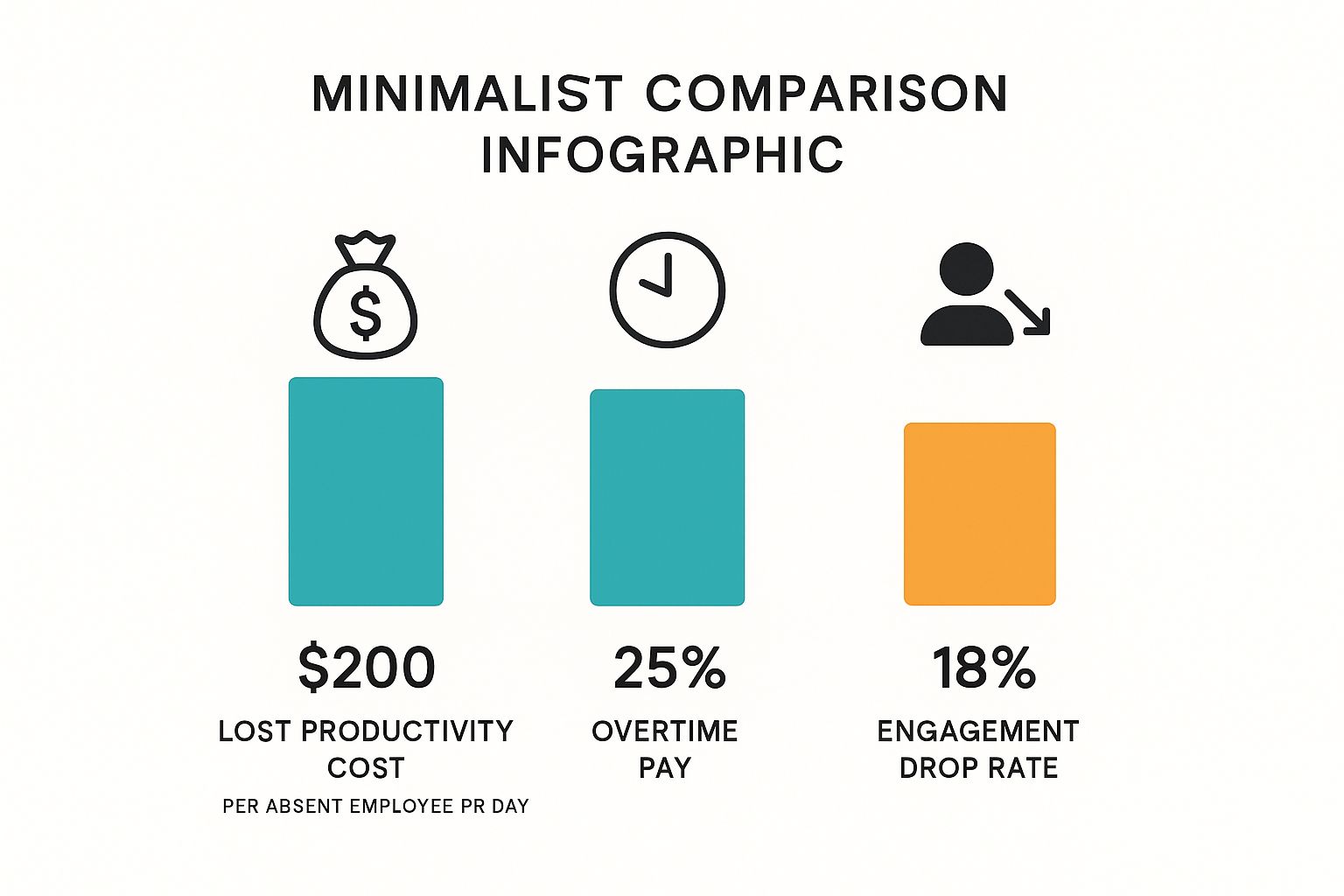
As you can see, the costs are spread far and wide, touching everything from labour budgets to the overall health of your workplace culture.
From Productivity Loss to Cultural Damage
Beyond the immediate financial pain, unchecked absenteeism chips away at something far more precious and difficult to repair: team morale. When the same reliable people are constantly covering for others, it’s a recipe for resentment and burnout.
That feeling of unfairness and being overworked is a direct path to disengagement. Before you know it, your best people start looking elsewhere, and you're left with the massive hidden cost of recruiting and training their replacements.
The cost of doing nothing is almost always greater than the investment in a solution. By not addressing absenteeism systematically, you are implicitly accepting ongoing losses in productivity, morale, and financial stability.
This is where tracking and analysing absence data with employee absence management software makes a world of difference. It helps you connect the dots, turning a vague problem into a clear financial metric. Suddenly, the return on investment for a proper system becomes incredibly obvious.
A Framework for Your Business
So, how do you work out the cost for your own company? It’s not just about adding up salaries. You need to look at the less obvious, but equally damaging, impacts.
Key areas to calculate:
- Lost Productivity: Think about the value of the work that didn't get done, plus the dip in efficiency from everyone who had to cover.
- Overtime Costs: The total bill for paying other employees to make up for lost time.
- Administrative Burden: The hours your managers and HR team spend juggling schedules, finding cover, and dealing with the associated paperwork.
- Impact on Morale: This one is tougher to put a number on, but consider the costs of replacing good people who leave because they're fed up and burnt out.
Recent figures show just how serious this is. For UK small businesses (fewer than 250 employees), the cost is estimated at £547 per employee annually. That number jumps to around £702 per employee each year for larger companies with over 1,000 staff. You can dive deeper into a full analysis of these UK absenteeism costs to see the broader picture.
What Features Should You Actually Look For?
Choosing the right employee absence management software isn't about finding the platform with the most bells and whistles. It's about pinpointing the core tools that will genuinely solve your problems, save you precious time, and give you proper control over workforce planning.
Think of these features as the engine of your new system. They’re what turn a chaotic, paper-shuffling process into a slick, automated workflow that helps everyone, from directors to the newest team members. A good platform should feel like a helping hand, not another piece of admin to wrestle with.
Automated Leave Requests and Approvals
One of the first things you'll notice is the time you get back from managing leave requests. The endless email chains, misplaced paper forms, and constant questions about holiday balances are a massive drain on everyone’s time.
An automated system flips this on its head. Employees can log into a portal, see their remaining allowance, check the team calendar for clashes, and fire off a request in seconds. That request lands directly with the right manager, who can approve or deny it with a click. Instantly, notifications are sent and calendars are updated. Simple.
This simple change empowers your team to manage their own leave and frees up managers from mind-numbing admin. A messy, multi-step chore becomes a transparent, two-click process.
It’s not just about speed, but consistency. Every request follows the same clear path, so nothing gets forgotten or falls through the cracks. Plus, you get a clean digital audit trail for every single absence.
Centralised Team Calendars
When you’re managing a team, visibility is everything. Without a single, reliable source of truth, scheduling becomes a complete guessing game. A centralised team calendar gives you an at-a-glance view of who’s in, who’s on holiday, and who’s off sick, all updated in real time.
This is a game-changer for planning. Before approving a holiday, a manager can instantly see if there’s enough cover, preventing those dreaded understaffed days and project delays. It also helps the whole team coordinate their plans, heading off scheduling conflicts before they even happen.
Reporting and Analytics
Here’s where modern employee absence management software really shines: it turns raw absence data into genuinely useful insights. Your old spreadsheets might show who was off and when, but they can't tell you the story behind the numbers.
This is what good reporting tools do. They help you spot things like:
- Absence Hotspots: Is sick leave suspiciously high in one department? It could be a sign of workload issues, management problems, or a dip in employee wellbeing.
- Popular Holiday Times: Knowing when your team likes to take time off helps you plan resources better and anticipate the annual leave rush.
- Bradford Factor Scores: Many UK systems calculate this automatically, helping you spot patterns of frequent, short-term absences that might need a closer look.
With these insights, you can stop just reacting to problems and start being proactive. You can address potential burnout before it takes hold, tackle morale issues, and make smart, data-driven decisions that improve attendance across the board. Plus, having accurate records for everything from sickness to maternity leave is crucial for staying compliant. To get even more from your data, you can learn about the best employee clocking in systems in our detailed guide, as this tech often links directly with absence software.
The move away from manual records isn’t just about convenience; it’s about fixing the fundamental problems of inaccuracy and wasted time. The difference is night and day, as you can see below.
Manual Absence Tracking vs Automated Software
The following table breaks down the stark contrast between grappling with spreadsheets and using a dedicated system for everyday absence management tasks.
| Task | Manual Method (e.g. Spreadsheets) | Absence Management Software |
|---|---|---|
| Requesting Leave | A mess of emails, paper forms, and verbal chats. | Instant submission through a simple self-service portal. |
| Checking Balances | Employees have to ask HR or their manager. | Real-time balance is visible 24/7 in their portal. |
| Approval Process | Forwarding emails and chasing managers for a decision. | Automated workflow sends instant notifications for action. |
| Team Visibility | An out-of-date wall chart or a confusing spreadsheet. | A live, centralised calendar everyone can access. |
| Generating Reports | Hours spent manually crunching numbers and making charts. | Instant, automated reports generated in a few clicks. |
As you can see, the efficiency gains are immediate. By automating these core processes, you reclaim valuable time that can be reinvested in more strategic work that actually grows the business.
How to Choose the Right Absence Management Software
Picking the right employee absence management software can feel like a mammoth task, but it doesn't have to be. For small and medium-sized businesses, the goal isn't to find the system with the most bells and whistles. It's about finding one that fits your budget, your team, and your plans for the future.
Think of it like buying a company vehicle. A massive lorry is complete overkill if you're just making local deliveries, but a tiny car won't do the job if you're planning to expand. You need something that's just right for today, with enough room to grow tomorrow.
Define What You Actually Need
Before you even glance at a demo, the first and most crucial step is to look inwards. You need a crystal-clear picture of what problems you're trying to solve. Just saying you want to "manage leave better" is too vague. You've got to pinpoint the specific headaches and what features are non-negotiable.
Start by chatting with your team and managers. Ask them what drives them mad about your current system (or lack thereof). This kind of feedback is absolute gold.
Key questions to ask yourself:
- How many people are on the team now, and what's a realistic headcount in two years? This will tell you if you need a system that can scale.
- What's the real budget? Factor in the initial setup and any ongoing monthly or yearly fees.
- Which types of leave are the biggest nightmare to track right now? Is it sickness, annual leave, flexible working days, or TOIL?
- Do you need to manage part-time staff or calculate leave in hours instead of days?
Answering these questions first gives you a solid checklist. It helps you cut through the marketing noise and focus on what your business genuinely needs.
Look for UK-Specific Features
For any UK business, compliance isn't a "nice-to-have"—it's a legal minefield you can't afford to get wrong. The right software should make navigating it simpler, not more complicated.
A brilliant example is Bradford Factor scoring. This is a standard UK metric for spotting patterns of frequent, short-term absences. A system that calculates this for you automatically saves a ton of admin and ensures you’re being fair and consistent with everyone.
Choosing a system that understands UK compliance is non-negotiable. It protects your business, ensures fairness for your employees, and removes a significant layer of administrative worry.
On top of that, double-check that the platform can handle UK holiday accrual rules, track statutory sick pay (SSP), and is fully GDPR compliant. Protecting your employee data is paramount.
Don't Underestimate How Easy It Is to Use
The most powerful software in the world is completely useless if your team finds it a pain to use. The system should feel intuitive and straightforward for everyone, from your least tech-savvy employee to your busiest manager.
An employee should be able to book a day off in a couple of clicks. A manager should be able to glance at the team calendar and approve that request without digging out a user manual. If a platform needs a week of training just for basic tasks, it’s probably not the one for a fast-moving small business.
Always, always ask for a free trial or a live demo to get a feel for it yourself. This is a critical step you should never skip. For more guidance on what to look for, check out our review of the 7 best small business HR solutions for UK firms.
Questions to Ask During a Demo
It’s easy to get wowed by flashy features during a sales pitch, even if you’ll never use them. Go into any demo armed with a list of questions that tie directly back to your core needs. This keeps you in the driver's seat.
- Integration: Can this connect with our calendars, like Outlook or Google Calendar? What about our payroll software?
- Support: What does customer support actually look like? Is it just an email address, or can we talk to a real person in the UK? What are the support hours?
- Onboarding: How do we get set up? Will you help us move our existing employee data over?
- Reporting: Could you show me exactly how to run a report on sick leave trends for one department over the last six months?
- Pricing: Are there any hidden costs we should know about? What happens to the price if our team grows?
Asking direct, practical questions helps you slice through the sales talk and see if the software is genuinely a good fit for how your company works.
Ensuring a Smooth Software Rollout
Picking the perfect employee absence management software is a fantastic first step. But even the best tech is useless if your team doesn't actually use it. A successful launch hinges on the human side of things, and a thoughtful plan is what separates a seamless transition from a frustrating false start.
The real goal isn't just to install a new program; it's to weave it into the fabric of your company culture. This means getting everyone on board, from senior leadership to the newest hire, by showing them exactly how this tool makes their working life better. People naturally resist change, so a clear, positive strategy is your best bet for getting everyone using it from day one.
Communicating the "What's in It for Me?"
Before you even touch on training, you need to earn your team's buy-in. People are far more willing to embrace a new system when they understand why it's happening and, crucially, what's in it for them. Don't just list features; frame the conversation around the benefits.
Instead of a dry announcement about a "new absence system," talk about how it's going to improve their day-to-day.
- For Employees: Talk up the new freedom of booking holidays through a simple self-service portal. Highlight the clarity of seeing their remaining leave balance in real-time and the fairness that comes from a consistent, automated process. No more guesswork.
- For Managers: Focus on the time they'll get back. No more trawling through old emails to find a request or spending hours updating a clunky spreadsheet. Now, it's all about quick approvals and having a crystal-clear view of who's in and who's out.
When your team sees the software as a tool that genuinely helps them, they're much more likely to get on board with enthusiasm.
A successful rollout is less about enforcing a new rule and more about introducing a better way of working. Clear communication turns potential sceptics into advocates for the new system.
Providing Training and Support That Actually Helps
Once your team understands the "why," it's time to show them the "how." Training shouldn't be a single, overwhelming information dump. The key is to tailor it to different groups to keep it relevant and easy to digest.
Your managers will need a deeper dive into things like running reports and managing team calendars. For most other employees, a short, sharp session on how to request time off and check their balance is all that's needed. It's also smart to use a mix of formats – think live demos, short video tutorials they can re-watch, and handy quick-reference guides – to suit how different people learn.
Most importantly, the support can't just stop on launch day. Make it incredibly clear who people should go to with questions. Having a designated internal 'go-to' person or a direct line to the software provider's support team creates a safety net. It builds confidence and encourages everyone to use the system properly, ensuring the change sticks for good.
Frequently Asked Questions
Even with a clear picture of the benefits, you probably still have a few practical questions about how employee absence management software really works day-to-day. Let's tackle some of the most common queries to clear up any lingering doubts before you take the next step.
We'll look at the practical side of things—how it connects with your other tools, data security, and whether it’s genuinely a good fit for smaller businesses.
Can This Software Integrate with My Payroll System?
Yes, and this is one of its biggest selling points. Most modern absence management platforms are designed to play nicely with the other software you already use. Think seamless connections to popular payroll systems, HR platforms, and everyday calendars like Outlook or Google Calendar.
This connectivity saves a massive amount of time. It keeps all your data consistent across every system, so you can finally say goodbye to manually copying information from one place to another—a process that’s both tedious and ripe for errors. For instance, when a holiday request is approved, it can automatically update your payroll, ensuring salary payments are always spot on.
The real magic of integration is creating a single, reliable source of truth for all employee data. When your systems communicate, you slash administrative busywork and dramatically reduce the risk of costly mistakes.
It all adds up to less time spent juggling spreadsheets and more time focused on what actually matters.
How Secure Is Our Employee Data?
Any reputable software provider treats data security as a top priority, especially when it comes to sensitive employee information. When you're weighing up your options, make sure you choose a platform that is fully compliant with UK data protection laws, including GDPR.
The best systems employ a whole host of security measures to keep your data locked down. These usually include:
- Data Encryption: This process essentially scrambles your data, making it completely unreadable to anyone without the right permissions.
- Secure Cloud Hosting: Your information is kept in highly protected data centres with multiple layers of both physical and digital security.
- Regular Security Audits: Good providers proactively test their own systems to find and patch any potential weaknesses.
Don't be shy about asking vendors for details on their security protocols during a demo. A provider worth their salt will be completely open about how they protect your company's information.
Is This Software Suitable for a Small Business?
Absolutely. In fact, you could argue that small businesses stand to gain the most. Many absence management tools are built to scale, with flexible pricing plans that are a perfect match for smaller teams.
For a small business, getting time-consuming admin off your plate is a massive win. The hours saved on manually handling leave requests and tracking holiday balances give owners and managers the breathing room they need to focus on growing the company. It also helps smaller teams stay compliant with UK employment law and provides clear insights into absence trends that would likely be missed in a manual system.
Ready to swap spreadsheet chaos for streamlined control? Discover how Annual Leave Tracker provides clean, intuitive software that makes managing your team's absence simple and stress-free. Start your free trial today and see the difference.
Ready to Transform Your Leave Management?
Join 500+ companies using Annual Leave Tracker to streamline their HR processes.
Related Articles

How to Calculate Pro Rata Holidays A Simple UK Guide
Working out pro rata holidays is actually quite straightforward. At its core, it's just about making...
September 24, 2025
How to Calculate Annual Leave Entitlement: UK Guide
Figuring out annual leave entitlement doesn't have to be complicated. The basic formula is simple:...
September 24, 2025
HR Systems for Small Business A Complete Guide
Trying to run a small business using spreadsheets and a jumble of different documents is a bit like...
September 25, 2025